Worked solution
Ellipse and circle: three ways to obtain faithful sketches
Sketch the ellipses:
(a) ,
(b) ,
and state the line(s) of symmetry.
CJC · Lecture · Example 4
(a) Method 1 — algebraic sketch
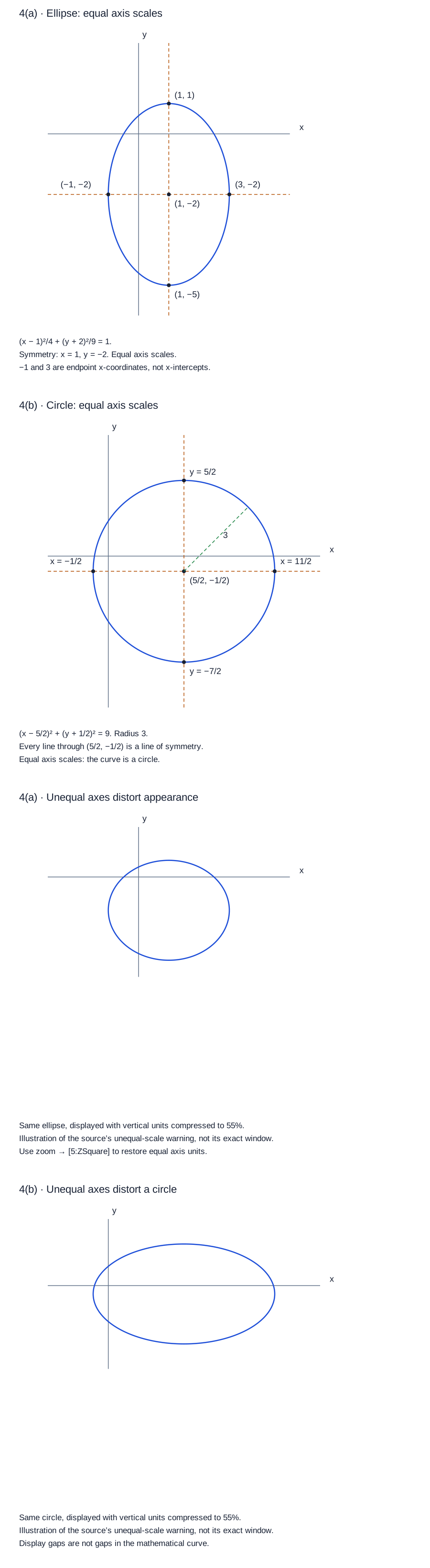
Rewrite the denominators as and : . The centre is , horizontal semi-axis , vertical semi-axis . The endpoints are . Draw a smooth closed ellipse, with symmetry lines and . The Teacher copy fills the centre, sketch and symmetry blanks in the Student copy.
(b) Method 1 — complete both squares
The source’s margin guidance says to convert the equation to standard form and complete the square for the and terms separately. Thus becomes so It is a circle centred at with radius . Its extreme coordinates are and . Every straight line passing through its centre is a line of symmetry; the two coordinate-parallel lines are only two examples.
(a) Method 2 — Conics application
Follow the source’s calculator table: apps → [2:Conics] → [2:ELLIPSE] → [2:]. The selected form is , since the application assumes . Enter A=3, B=2, H=1, K=−2, then graph. The displayed graph is the vertical ellipse from the algebraic method. Use trace to view coordinates, retaining the source warning that traced values may not be accurate. The labels A/B in this selected app form must not be swapped with the horizontal/vertical denominators.
(b) Method 2 — Conics application
Follow apps → [2:Conics] → [1:CIRCLE] → [2:]. This form is . Enter A=1, B=−5, C=1, D=−5/2, then graph and trace if needed. The source also offers [1:], the centre-radius form , corresponding to . Its remark recommends using the given equation directly as a check against algebraic manipulation errors. Traced coordinates may not be accurate; the exact centre and radius come from the algebra.
(a) Method 3 — two explicit functions
Press y= and enter The real domain is . Press graph. The source’s first screen has unequal axis scales, so the displayed shape can be misleading. Press zoom → [5:ZSquare] to use equal axis units. The source’s final screen has small rendering gaps, but the mathematical ellipse and the answer drawn must be continuous and smooth: the two branches meet at and .
(b) Method 3 — two explicit functions
Press y= and enter The real domain is . Press graph, then zoom → [5:ZSquare] to correct the unequal-axis distortion shown in the source. The two branches meet at and . The screen’s pixel gaps are not discontinuities of the circle: draw a smooth, continuous closed curve.
Compare your sketch
Expand diagramFit diagram to page
Use the scrollbars or arrow keys to inspect details.
Common mistakes
A circle has infinitely many symmetry lines through its centre. Calculator axis distortion and pixel gaps do not change the mathematical curve.
Solution notes
Student and Teacher copies: PDF pages 9–13, printed pages 121–125. All three methods, both parameter-entry tables, both explicit-function tables and source warnings compared. No marks are printed.
Calculator menus and key settings are transcribed from the source workflow; screenshot interface chrome is retained in the original PDF rather than reproduced. All mathematical inputs, selected forms, parameter values and graph/trace/zoom actions are available in text.
In the ellipse sketch, −1 and 3 label the horizontal extreme coordinates at y=−2; they are not its x-intercepts. The reconstructed diagram uses full endpoint coordinates to avoid that ambiguity.
The final solution panels use equal axis scales. Two additional panels illustrate vertical compression to 55% to explain the source warning; that factor is authored, not a claim about the source calculator window.