Worked solution
Choose the correct branch of a modulus graph
Sketch the graphs of and on the same axes and determine the coordinates of the point of intersections of these two graphs.
CJC · Lecture · Example 10
Answer
and .
Sketch the reflected curve and identify each branch
The Teacher completes the line on the Student sketch. The modulus curve has zeros and height 3 at 0. Outside it follows ; inside it follows . The source labels the right-hand intersection on the original upward branch and on the reflected central section. The line crosses the -axis at 1.
The source’s “Equivalence” note connects algebraic and graphical representations. Independently requires at any intersection, so . This rules out intersections on the negative side before solving.
Expand diagramFit diagram to page
Use the scrollbars or arrow keys to inspect details.
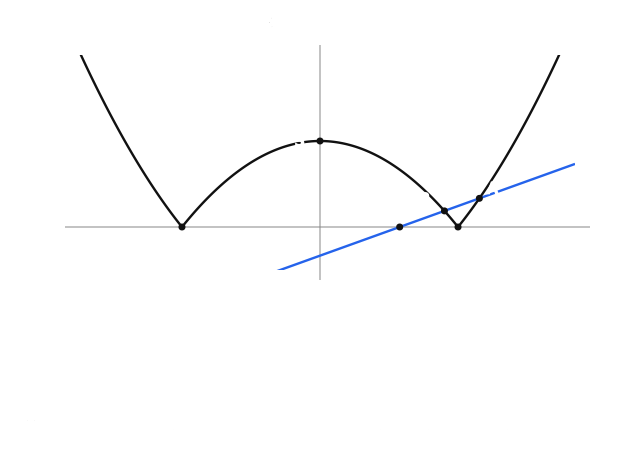
A: use the unreflected quadratic branch
Answer
.
The source’s complete algebra is
This gives or 2. The source rejects −1 using the diagram. Independently, the branch requires and every intersection requires , so −1 is invalid. At , , giving .
B: use the reflected quadratic branch
Answer
.
Both copies give
then the full quadratic-formula chain
The diagram rejects . Independently it is negative and outside the active central interval; the valid root lies between 1 and . Substituting into gives . Thus
The source warns to use the correct pair of Cartesian equations when finding intersections involving a modulus. The two disjoint active regions above account for every possible intersection.
Calculator setup: enter and enlarge both curves
The source’s six-step procedure begins on 26:
- Enter in Y₁ and in Y₂. For modulus, use MATH → right-arrow → 1:abs(, or ALPHA → WINDOW → 1:abs(. Group the whole quadratic inside abs.
- Select ZOOM → 6:ZStandard, giving and .
- Select ZOOM → 2:Zoom In, move the cursor near the two intersections and press ENTER to enlarge that portion.
- Press 2nd → TRACE → 5:intersect. The menu also shows value, zero, minimum, maximum, dy/dx and integral operations; intersect is the operation needed here.
The reconstructed screens retain the two entries, standard/enlarged views and selected menu. The enlarged reconstruction uses explicitly chosen bounds, not claimed original settings.
Set up the modulus intersection calculation
1. Enter both curves
Open Y=. For abs( use MATH → right arrow → 1:abs(, or ALPHA → WINDOW → 1:abs(.
- Y1
- X-1
- Y2
- abs(X²-3)
2. Find a useful viewing window
Use ZOOM → 6:ZStandard, then ZOOM → 2:Zoom In. Move near the crossings and press ENTER. The reconstruction uses an independently chosen zoom window.
3. Select the intersection tool
Press 2nd → TRACE → 5:intersect. Near each crossing, confirm First curve?, Second curve? and Guess? with ENTER.
Repeat the calculation near both crossings. Cursor positions and an initial guess are not solved intersections. Original calculator screens remain below; an exact question still needs algebraic coordinates.
View original calculator screens
Expand diagramFit diagram to page
Use the scrollbars or arrow keys to inspect details.
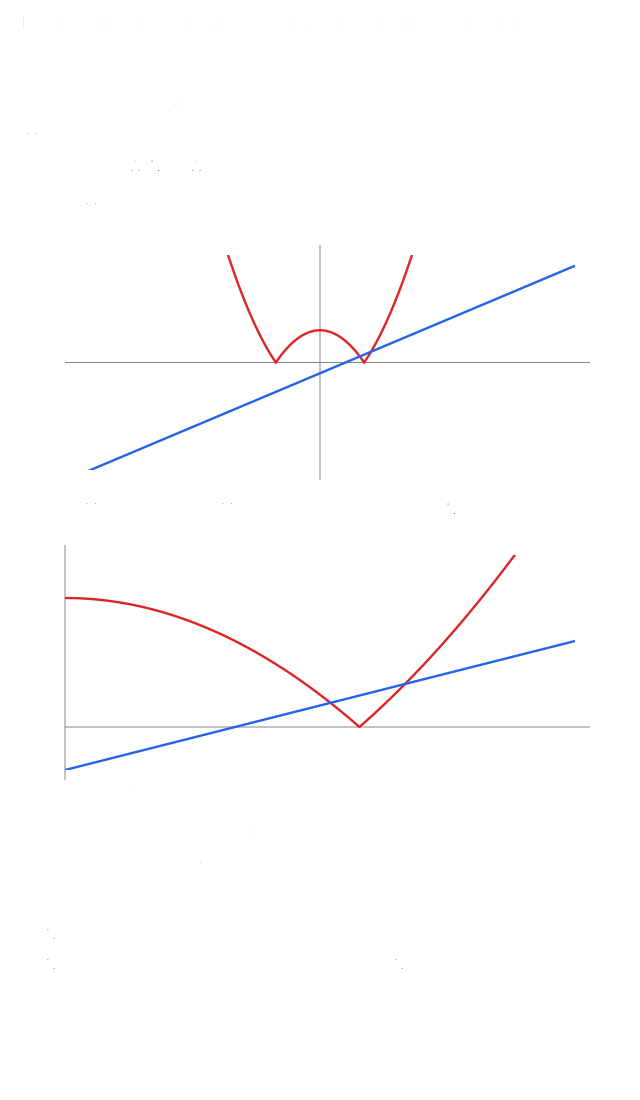
Calculator A: choose both curves and supply a guess
Answer
Calculator result: , .
Step 5 continues across 26–27. With First curve? showing Y₁, move near and press ENTER. With Second curve? showing Y₂, press ENTER. At Guess?, press ENTER again. The result appears at the bottom as Intersection: X=2, Y=1.
The source’s intermediate cursor is approximately , with Y₁≈1.0833333 and Y₂≈1.3402778. These are cursor/guess readings before the solver result, not an additional intersection. The final A result agrees with the algebra.
Separate cursor readings from solved intersections
1. Solve near A
With Y1=X−1 and Y2=abs(X²−3), use intersect near the right-hand crossing. Confirm both curves and a nearby guess.
Intersection A: X=2, Y=1
2. Repeat near B
Repeat the three confirmations near the other crossing.
Intersection B: X≈1.5615528, Y≈0.5615528
3. Check the exact coordinates
The second intersection is B=((−1+√17)/2, (−3+√17)/2). Initial source cursor readings such as X≈1.5151515 are guesses, not this solved point.
Keep both intersections and the correct modulus branch. Rounded calculator output checks the algebra but does not replace exact coordinates when they are required. All original cursor/result screens are retained below.
View original calculator screens
Expand diagramFit diagram to page
Use the scrollbars or arrow keys to inspect details.
Calculator B: repeat near the second intersection
Answer
, ; exact coordinates are the radical pair above.
Step 6 repeats the same sequence nearer : select Y₁ at First curve? and press ENTER; select Y₂ at Second curve? and press ENTER; at Guess?, press ENTER. The source’s intermediate has Y₁≈0.5151515 and Y₂≈0.7043159. The solver’s final screen gives , .
The closing source remark requires algebraic/analytical working whenever exact values are requested; a graphing-calculator result is non-exact. The exact radical result in the preceding part agrees with the rounded screen, and should be retained as the final mathematical answer.
Common mistakes
Solving a branch equation alone can produce candidates that are not intersections of the original modulus graph. Cursor and guess readings are not solver results.
Solution notes
Both originals visually compared on 24–27, including every calculator screen. Teacher adds the line and its label to the intersection sketch. Shared algebra, Equivalence note, six-step calculator procedure and exact-value warning are integrated. Native extraction loses visible modulus bars; the authored prompt follows the rendered original. No printed marks or external attribution.