Worked solution
Find ranges without losing endpoint conditions
Determine the range of each of the following functions. (a) , , . (b) , , .
CJC · Functions · Example 3
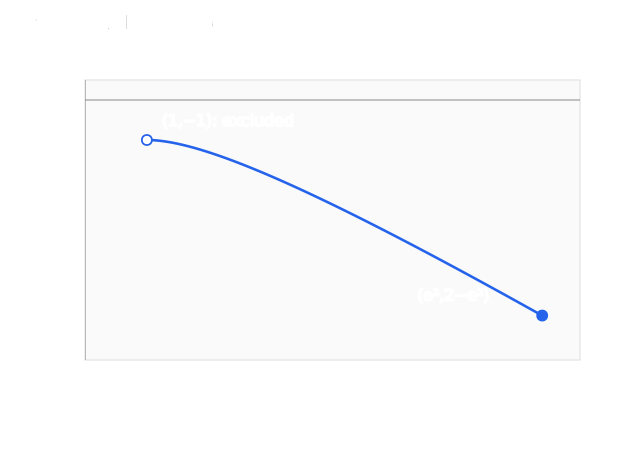
(a) Read an open maximum limit and a reached minimum
Answer
; the Teacher prints with a rounded lower endpoint.
The Teacher graph marks an open point and a closed point . Independently for x>1, so the function decreases throughout its printed domain. At the included right endpoint ; as the output approaches −1 without reaching it. Continuity gives every value between. The rounded −5.39 is not an exact endpoint.
Expand diagramFit diagram to page
Use the scrollbars or arrow keys to inspect details.
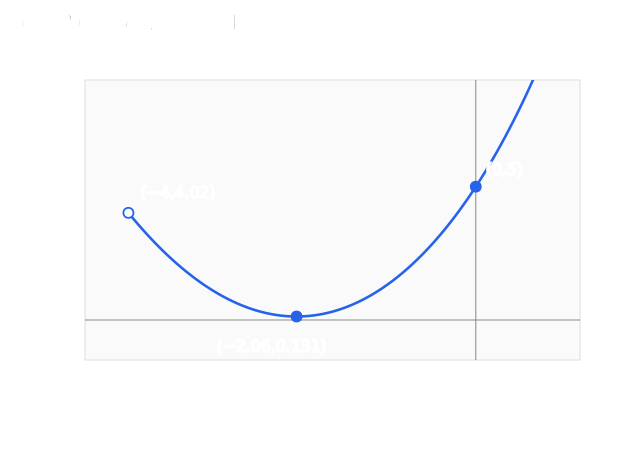
(b) Keep the interior minimum
Answer
where and . The source prints .
The Teacher completes the graph with excluded , y-intercept 5 and included minimum approximately . Independently and , so the derivative is strictly increasing. It is negative at −4 and positive at −2, giving exactly one zero inside the domain. The curve decreases then increases without bound, so its minimum m is attained. Excluding −4 does not remove that interior minimum. The printed point 4.02 and minimum 0.131 are rounded values.
Expand diagramFit diagram to page
Use the scrollbars or arrow keys to inspect details.
Calculator steps 1–3: enter a conditional graph
The source screen reads ln(X)−X/(1<X and X≤e²): the slash follows the final X, without parentheses around the entire difference. A true Boolean condition evaluates to 1, leaving ln(X)−X unchanged; a false condition evaluates to 0 and suppresses the point through division by zero. Dividing the whole numerator by that same condition would give the same permitted graph, but is not the literal source entry. This is calculator-specific syntax, not division by an interval.
Enter the rule
Press Y= and enter ln X − X in Y₁.
Add a conditional denominator
Append a slash using ÷, then an opening parenthesis. The source screen places the division after the final X: ln(X)−X/(condition). When the condition is true it equals 1 and the original expression is unchanged; when false, division by zero suppresses the point.
Select the interval condition
Press 2nd → MATH for TEST, highlight CONDITIONS and choose 8: <X and X≤. This supplies two comparisons joined by and.
Enter a conditional graph without losing its domain
1. Enter the original rule
Press Y= and enter ln(X)−X in Y1.
2. Append the calculator condition
Append ÷ and an opening parenthesis. Press 2nd → MATH, select TEST → CONDITIONS and choose row 8: <X and X≤.
3. Complete the endpoint conditions
Use lower bound 1 and upper bound e². The literal source division follows the final X, as shown here.
- Y1
- ln(X)-X/(1<X and X≤e²)
This is calculator-specific Boolean syntax. A true condition evaluates to 1; a false condition gives division by zero and suppresses the input. It is not division by an interval. The allowed inputs are 1 < x ≤ e². Keep the source parentheses and endpoint signs.
View original calculator screens
Expand diagramFit diagram to page
Use the scrollbars or arrow keys to inspect details.

Calculator steps 4–9: enter bounds and trace
Fill the upper bound
For e² use the source sequence 2nd → ÷ (the e constant) → ^ → 2. Close the parenthesis after the upper bound.
Fill the lower bound
Move left until < is highlighted; press 2nd → DEL to insert 1 before it. The completed restriction is (1<X and X≤e²).
Graph the restricted rule
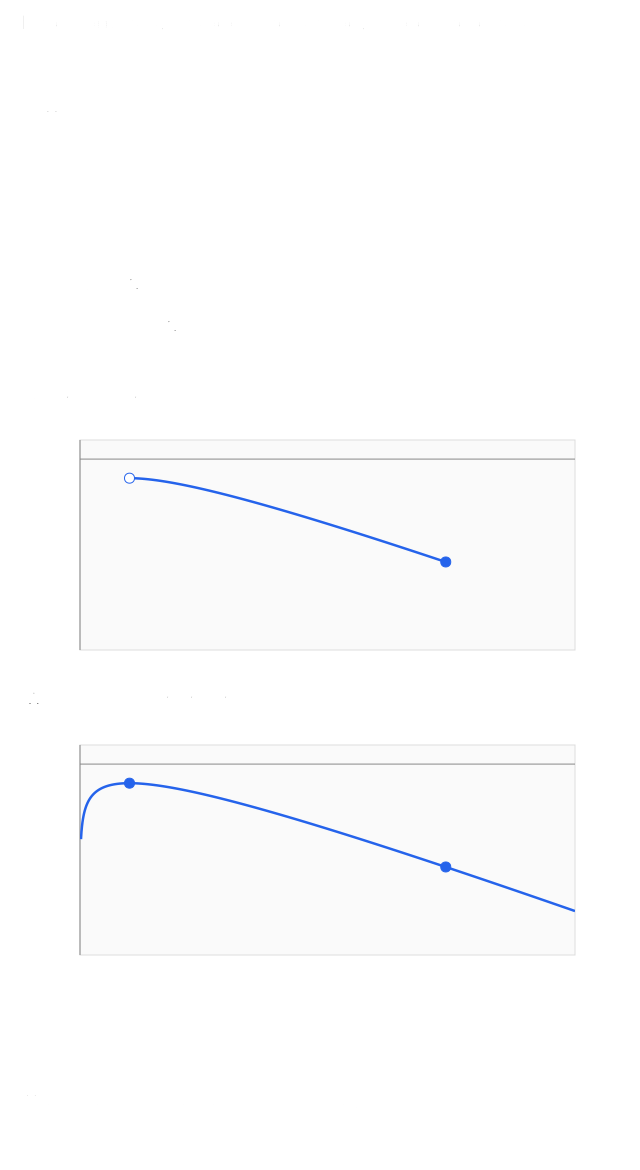
Press GRAPH. The source shows the restricted shape and warns that its endpoints are not easy to read from this screen.
Remove only the temporary restriction
Press Y= and delete the domain condition, including the slash, leaving Y₁=ln(X)−X.
Graph the natural-domain rule
Press GRAPH. The source says “all real values of x”; qualify this: the logarithm still requires x>0, even after the additional interval condition is removed.
Trace the boundary coordinates
Press TRACE → 1 → ENTER, then TRACE → 2nd → ÷ → x² → ENTER. The screens report X=1,Y=−1 and X=7.3890561,Y=−5.389056. The first input is excluded from the original function and the second included; tracing does not change those endpoint statuses.
Trace coordinates and retain endpoint membership
1. Fill the bounds
For e², use 2nd → ÷ (e) → ^ → 2 and close the condition. Move left to < and use 2nd → DEL to insert the lower bound 1.
2. Graph the restricted rule
Press GRAPH for 1 < x ≤ e². A calculator picture can make endpoint inclusion hard to read.
3. Inspect the unrestricted rule
Remove the condition and slash in Y=, keeping ln(X)−X. Press GRAPH; its natural real domain is still x > 0.
4. Trace both boundary coordinates
Use TRACE 1 ENTER, then TRACE at e² using the retained key sequence 2nd → ÷ → x² → ENTER.
Trace both boundary coordinates Input Source display 1 −1 7.3890561 −5.389056
Tracing a boundary coordinate does not include an excluded endpoint. In the original restricted graph, x=1 is excluded and x=e² is included. Removing the condition does not make ln(X) defined at nonpositive inputs.
View original calculator screens
Expand diagramFit diagram to page
Use the scrollbars or arrow keys to inspect details.
Solution notes
Student contains blank graph/range responses; Teacher completes them. Both copies have all nine calculator rows. Exact calculus/range qualifications and the unique minimizer proof are independent supplements.