Vectors: lines and perpendicular feet
Choose the angle between two lines
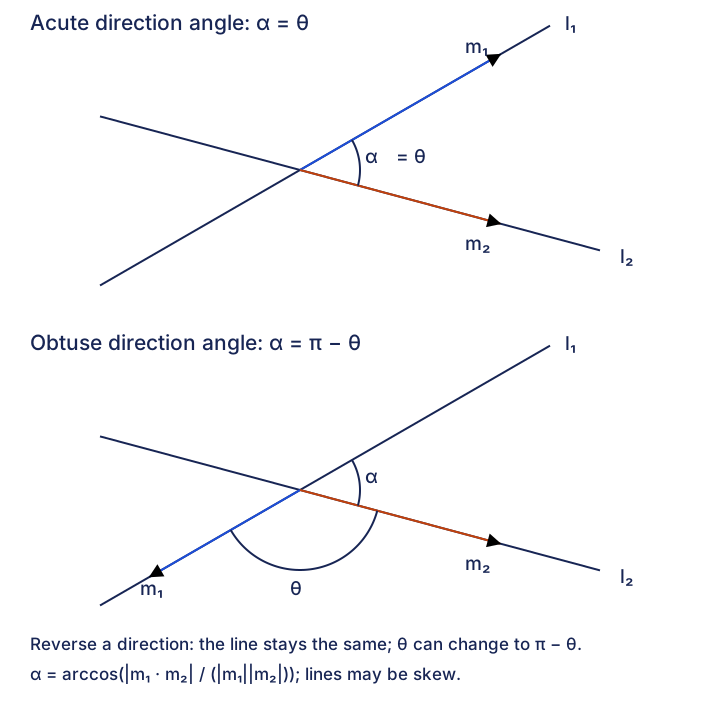
Read which angle is asked for before using a dot product. Reversing a direction changes the directed-vector angle but preserves the smaller angle between the lines.
Extract two nonzero directions
Use the vectors multiplying the independent line parameters. The fixed position vectors locate the lines; they do not determine the angle.
- Intersecting or skewAn intersection is unnecessary
Translate the direction vectors to a common starting point to compare them. Skew lines still have an angle between their directions; a nonzero angle alone does not prove the lines intersect.
A zero direction does not define a line. A zero component is allowed. Keep separate parameters for the two line equations.
Choose the requested angle
For the smaller line angle, take the absolute value of the dot product. For an angle between specified directed vectors, retain its sign.
- Smaller line angleRemove direction reversal
-
This gives . The source calls this the acute angle; the parallel and perpendicular boundaries are and .
- Specified vector angleKeep the signed dot product
-
This gives . For an internal angle ABC, use BA and BC, both directed from the vertex B. An absolute value could replace the required obtuse angle by its supplement.
Inverse cosine is not a reciprocal. Set the calculator to the requested degree or radian mode, and retain full precision until the final answer.
Check the angle and the geometry
The same supporting lines can be represented using reversed or rescaled directions. Their smaller angle must stay unchanged. In radians use π − θ for the supplement; in degrees use 180° − θ.
- Reversed directionThe vector angle may change
Reversing one direction replaces by and by . The value , and therefore the smaller line angle, stays the same.
- Boundary casesSeparate angle from line relationship
A zero dot product gives a right angle between directions. Parallel directions give a zero smaller angle; the lines may be distinct or coincident. Check positions separately when classifying the lines.
Use the smaller-angle rule only when that convention is requested. Do not force an internal polygon angle or a specified vector angle to be acute.
Try a worked example
Read a case, make a prediction, then reveal the reasoning. The examples keep their stated values.
Source Example 26: use the directions
The source directions are and . Predict whether their directed-vector angle is already acute before calculating.
Show reasoning
1. Find the dot product and lengths
The fixed line points do not enter the angle calculation. The positive dot product predicts an acute directed-vector angle.
2. Calculate the smaller angle
The direction angle is already acute, so its supplement is unnecessary. Round only the final answer to one decimal place.
Reverse a direction, preserve the line angle
Authored comparison using Example 26: replace the second direction by . Predict what changes and what stays the same. Both lines still use unrestricted real parameters.
Show reasoning
1. Keep the sign for the vector angle
The dot product becomes minus 13. The directed-vector angle is now obtuse, although the supporting line is unchanged.
2. Take the supplement for the line angle
Use the unrounded angle in a calculation, or take the absolute dot product directly. Reversing or nonzero rescaling cannot change the smaller angle between these lines.
Source Example 27: an internal angle can be obtuse
The source asks for the internal angle OAB. Both and start at A. Predict why an absolute dot product would answer a different question.
Show reasoning
1. Use both vectors from the vertex
The signed dot product is minus 105. Their lengths are square-root 251 and square-root 105, so the internal angle is obtuse.
2. Retain the obtuse answer
The source rounds the internal angle to the nearest degree. Taking an absolute value would instead give about 50 degrees, the smaller angle between the supporting lines.
Compare the source angle constructions
Expand diagramFit diagram to page
Use the scrollbars or arrow keys to inspect details.